Caring for Mom or Dad shouldn't live in six group chats.

Hearthwick gives your family one shared care circle — medications, tasks, appointments, and a two-tap “I called Mom” — synced to every sibling the moment anything happens. Plus one short brief a day, only when there’s news.

Free for the essentials. No card required. Now on the App Store and Google Play.

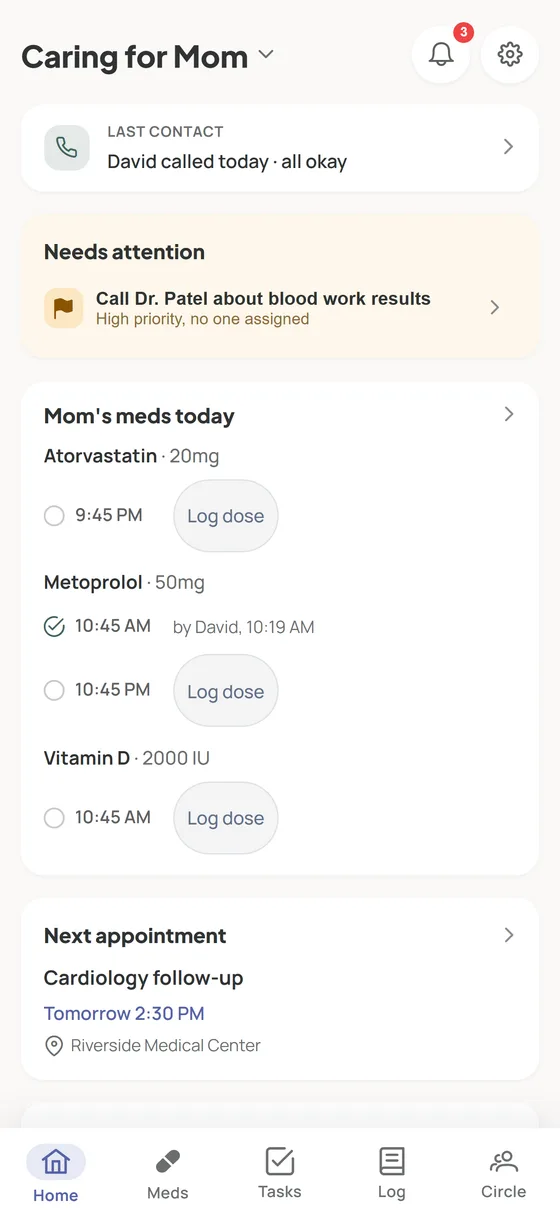
The Hearthwick dashboard on a phone, showing today's medication slots, the I called / I visited / I checked in row, a needs-attention card, and the next appointment
David called Mom — all okay
Sarah said yes to “Pick up groceries”
2:00 PM dose not logged yet
Texts scroll away. Calls get forgotten. Whoever lives closest carries it all — and everyone else feels guilty asking for updates. Hearthwick replaces the scramble with one place your whole family can trust.

See it in 25 seconds

One sibling logs the dose — every phone in the family knows.

Up and running in one evening

  1. 1

    Create your parent's circle

    One circle per parent. Add a photo and the practical notes everyone should know — preferred name, doctors, neighbors with a key.

  2. 2

    Add the care that matters

    Set up medications with reminder times, the recurring errands, and upcoming appointments. Start with one — you can grow it any time.

  3. 3

    Invite your siblings — or just ask

    Share a link, or send a task as the invitation: “Can you take Mom to cardiology on Tuesday?” One tap says yes, and they’re in the circle with the job. No forwarding, no “wait, which chat was that in?”

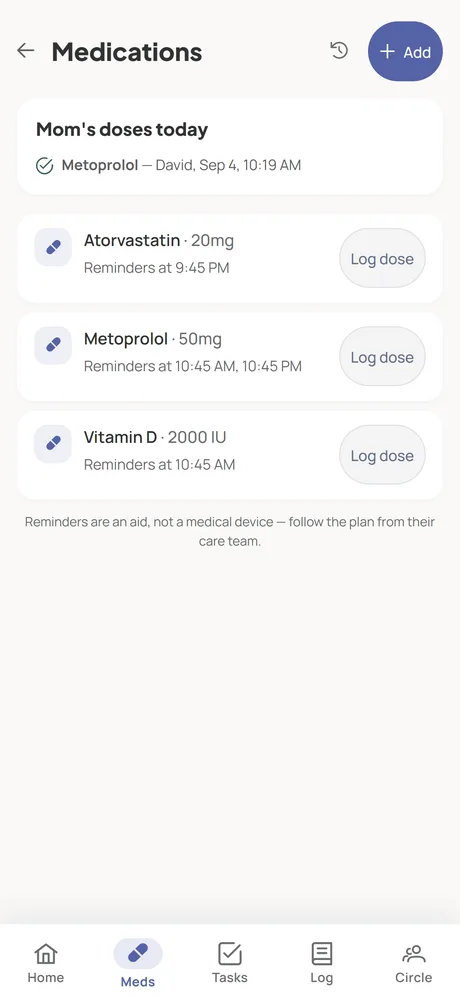
Medication list in Hearthwick with reminder times and one-tap dose logging

Never wonder if the meds were given

Reminders go to the whole circle at the times you set. One tap logs the dose — given, skipped, or unsure — and everyone sees it instantly. If a dose goes unlogged, the circle knows before it becomes a pattern.

  • Scheduled or as-needed — every medication says which
  • Full dose history you can show the doctor
  • Reminders are always free — and pause themselves if nobody's logging
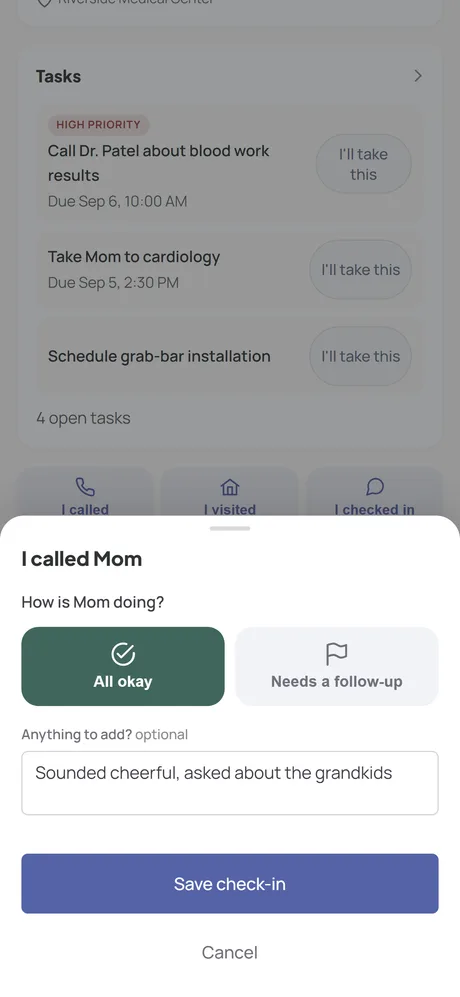
The Hearthwick dashboard with the check-in sheet open: I called Mom, all okay, with a short note

The far-away sibling finally has eyes — and hands

“I called Mom — all okay” takes two taps, and the whole family knows she's been talked to today. Every visit, call, and observation lands in the shared care log; a short daily brief tells you what needs someone and what your family did — only when there's news — and the weekly digest turns it all into a summary you can read in a minute, wherever you live.

  • Check-ins: called, visited, or checked in — “all okay” or “needs a follow-up”
  • A daily brief at the time you choose, and silence when nothing happened
  • Assign tasks and see who did what — the load stays visible

Free for the essentials

Everything a family needs to coordinate care is free — for as many siblings as you have.

Free

  • One care circle, unlimited family members
  • Medications with reminders and dose logging
  • Shared tasks, appointments, and asking a sibling for help
  • Check-ins, the daily brief, and the shared care log

Premium

  • AI weekly digest of the care log
  • Care record and medication history exports
  • Recurring tasks
  • Circles for more than one parent

One subscription covers the whole circle.

Premium is how Hearthwick makes money — not ads. There are no ads and no third-party trackers in the app, and your family's information is never sold.

Get Hearthwick

Start free in your browser, or get the app for iPhone or Android.

From the guides

Practical, no-jargon help for families splitting a parent's care — free, whether or not you use Hearthwick.

How to coordinate care with your siblings

The five conversations to have, how to divide the work fairly, and what to do about the sibling who doesn't help.

A printable medication list for your parent

What to include, where copies should live, and the habits that keep it from going stale.

Long-distance caregiving that actually helps

What to own from another city, how to make visits count, and how to support the sibling who lives close.

All guides →

Questions families ask

Is Hearthwick a medical app?

No. Hearthwick helps your family coordinate care — reminders, task-sharing, and a shared record of what happened. It doesn't provide medical advice, and it isn't a substitute for your parent's doctors or pharmacists.

How many family members can join a circle?

As many as you have. Hearthwick never charges per person — siblings, in-laws, and close friends can all join the same circle free.

Does everyone need to install an app?

No. Hearthwick runs in any browser at my.hearthwick.app, so the sibling who never installs anything can still take part. The iPhone and Android apps add push reminders on the go.

Can we use it for both parents?

Yes — each parent gets their own circle, with its own members, medications, and care log. Multiple circles are part of Premium.

Is our family's information private?

Your circle is visible only to the people you invite. There are no ads and no third-party trackers in the app — Premium subscriptions are the business model, not your data. We don't sell personal data, and you can export your records or delete your account — and everything in it — at any time. See our privacy policy.

What happens when the person paying stops?

Nothing is lost. Your records, reminders, and circle stay intact — only the Premium extras (like the weekly digest) pause until someone subscribes again.